UmP!
A ball bounces down a cylindrical tunnel and its jumps lock to the music. Steer left and right to land on the rows of tiles on the beat — over the holes, clear of the tiles that cost a life.
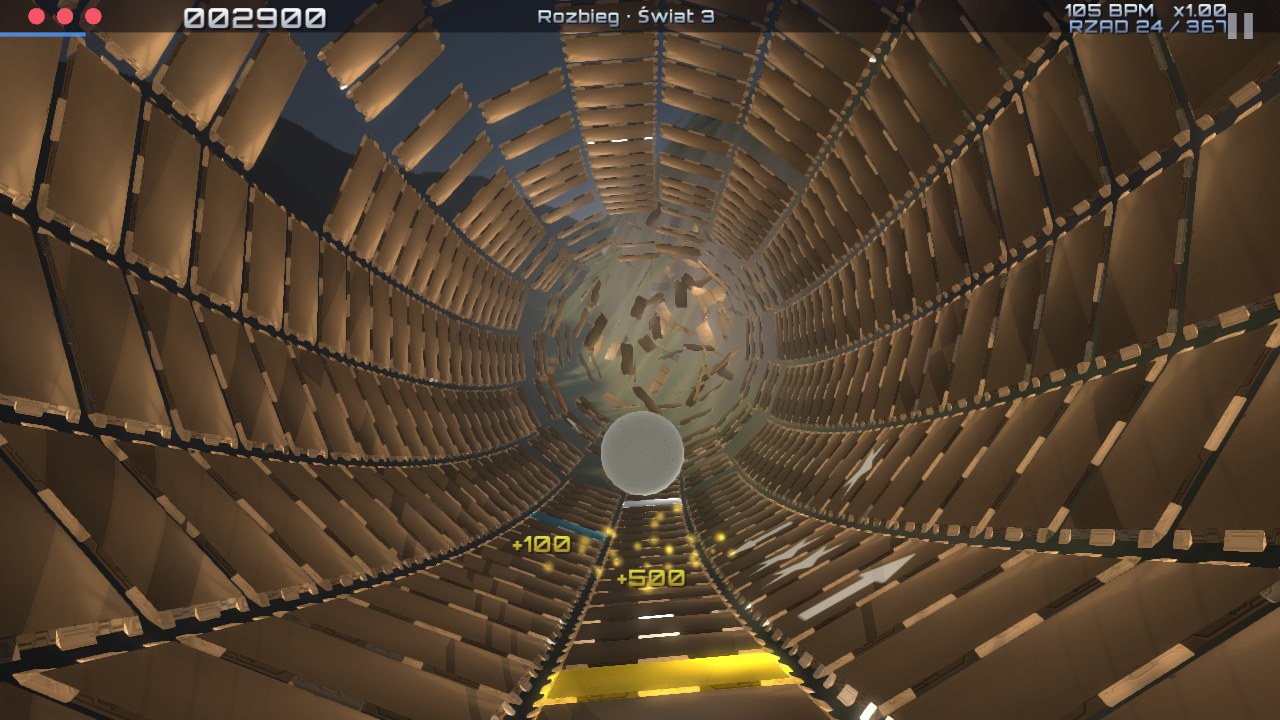
Out now in the Microsoft Store for Windows. Screenshots are from the game, September–October 2026.
What It Is
UmP! — Unsettled Music Pipeline — is a rhythm game. You are a ball rolling down the inside of a cylindrical tunnel, and every jump is timed to the track. The rows of tiles coming toward you are the beats: land on them in time and you score; miss, hit a hole, or clip a hazard tile and you pay for it.
You steer left and right — rotating the tunnel under the ball, or walking the ball around the ring — to line up the safe tiles as the music carries you forward. Every level is laid on the beats of its own song: quiet phrases bring stars and room to breathe, loud ones bring the action, and the strongest moment of a mission lands right on the drop.
It is out now as a native game for Windows in the Microsoft Store, with an Android version on the way. A browser version adds a level editor and your own music, so any track can become a course.
Features
♪The beat is the level
Rows come at you one per beat, and the tiles you must land on sit on those rows. They follow each song's own beat grid, so they stay on the beat even where a live-played track drifts in tempo, and a level lasts exactly as long as its song. Quiet phrases bring stars, peaks bring the action, and a trail of stars runs on the beat.
🌐12 worlds, 120 missions
Twelve worlds of ten missions, from Crystal Shafts to the Heart of the Core — 120 levels and about six and a half hours of music. Easy, normal and hard are three different maps of every mission, with progress kept for each. Every mission has a character of its own — gates and slaloms, forks, arrow walls, jumps over the void, darkness, rings, a narrow path and a finale with everything — and new elements are first shown on their own, then used, then tested. Missions and worlds open one after another.
📷Two ways to look
Play with the tunnel turning under a ball fixed at the bottom of the frame, or with the ball moving around a tunnel that holds still while the camera pulls back onto the axis and the whole ring comes into view. Same game, same levels — only the camera changes. Five camera views in all; the extra ones sit further back, behind the ball, so the bends ahead read early.
🎧Bring your own music
In the browser version, drop your tracks into the library (kept on your device) and the game reads their beat and BPM. Point a level at a song and its rows become the song's beats — the whole course rides the music.
✏A level editor
The browser version has a level editor: build courses on a wrapping grid against the song's timeline. Align to beat locks the rows to the track's BPM and offset; Sync with music goes further and lays tiles to the rhythm for you. Levels are plain JSON — portable between the web and native builds.
⚽Pick a ball
Seven balls with procedurally-drawn textures — a classic, a football, an Amiga Boing homage, a disco ball, metal and rubber among them — each rolling with real spin as it travels the tiles.
✨A tunnel that really bends
The track has a true heading, not a wobble: arcs, esses and corkscrews turn the tunnel around you, 34–54° across a single screen. A ray-marched sky turns with the view and now shows through the tunnel's far exit, bloom lifts the lights, and the holes in the tunnel are real gaps you can see straight through. On levels that switch it on, the far end of the tunnel is assembled as you go from tiles that fly in, tumble and snap into place.
🖥Web and native, one core
It runs as a native C++/SDL2 game for Windows, Linux and Android, drawn with OpenGL or Vulkan, and in the browser on WebGL (plain JavaScript, no bundler). The game's core — the RNG, the timing, the tunnel path and the rules — is verified bit-for-bit identical between the two, and both play the same 120 maps, so a level plays the same everywhere.
📺Demoscene effects
Any row can switch on demoscene effects, set from a column of their own in the editor. The format carries fifteen, nine of them already drawn: shadebobs and copper bars, a tunnel that breathes to the bass, band-reactive tiles, a spectrum-driven sky, radial blur on the beat, a kaleidoscope, scanlines and feedback trails. Edges are smoothed with FXAA.
🔀Forks in the tunnel
The tunnel can split in two and merge again. Each branch runs on a track of its own, the two tubes share one cross-section where they part and where they meet, and the tiles close up at the joins without gaps. The camera follows the ball into whichever branch it takes, and the level generator lays forks as rewarding detours, with bonuses waiting in the side branch.
🌟Bigger signs, a disco light
The signs on the tiles are twice as big and now fill about 80% of the tile, so they read from further off. A new light sign turns the ball's light into a volumetric glow like a disco ball — coloured beams from all over the ball, spinning with it — and the darker and brighter signs step the picture by 15% at a time, easing smoothly into each step. Every sign now turns up on the route from the very first world, and a restore default boards button brings back the stock worlds while keeping your own levels and playlists.
📱Made for touch
On Android the menus are built for fingers: big full-width buttons that light up under your finger, lists you scroll by dragging, a back button in the corner and the system Back key. The options are split into Game, Video, Sound and Calibration tabs, and screens cross-fade into one another over 1.5 seconds. Play is smoother too, and a draw resolution option — 100, 85, 70 or 55%, 75% by default — lets the phone draw fewer pixels.
🚶Steer by walking
On Android phones the ball can now be steered by stepping sideways. ARCore follows the phone against the room, and a step to the side turns like a tilted stick. Or stand the phone up and let the front camera follow you instead. On a phone without ARCore the game falls back to touch by itself.
🎯A Calibration tab
A new Calibration tab in the options picks how you steer and tunes it. Walking gets a live camera preview: hold still to set the centre, then step left and right — the centre lands halfway between your two furthest steps, and the rear or front camera is one switch away. The gyroscope can be re-centred here too, not only from the pause menu.
🌌New skies
Three new backgrounds open up behind the tunnel: a spiral tunnel in world 8, a nebula tunnel in world 4, and a twinkling trail of light that winds through the first world and behind the menu, turning with the track. New backgrounds show up in the editor's list by themselves.
🌊Four new signs
Wave makes the tunnel ripple, the wave setting off from under the ball and growing as it runs into the distance. Water sends drops running down the screen — one at first, then more — each bending the picture like a lens. Bounce throws the ball right up to the tunnel's ceiling on every hop. Torch turns the lights out for eight seconds: the ball lights a cone ahead and you see only a piece of the tunnel.
🎶A soundtrack of its own
The game now carries its own music: ten tracks that come with it, ready to play before you add anything to the library. And where a level turns the tunnel, it now turns smoothly instead of in steps.
🚦About twenty signs
About twenty signs ride on the tiles, each sign tile in a colour of its own: bonus, hops left and right, darker and brighter, quake, disco light, TV, wave, rain, bounce, torch, long jump, teleport, tunnel turns, inverted controls, cracked and vanishing tiles, and save points.
🎨Moves with the music
The picture reacts to the song: the sky brightens with the volume and flashes on the bass, and the tiles light up on the beat. Pick one of four menu looks (neon by default), or switch on an old-TV mode and optional ray-traced reflections.
Screenshots


System Requirements
In the browser. UmP! runs on WebGL in any modern browser. It is plain JavaScript — nothing to install, no bundler — and it even runs straight from a local file; a small preview server is included for serving it over HTTP.
As a native build. On Windows UmP! installs from the Microsoft Store (Windows 10 version 1809 or later, 64-bit) and draws with OpenGL or, optionally, Vulkan. The same C++/SDL2 game also runs on Linux and on Android with GLES2, with the same seven interface languages as the web. Levels are plain JSON and move between the web and native builds unchanged. On Android, steering by walking needs a phone with ARCore — it is optional, touch works everywhere — and the draw resolution can be lowered for weaker phones.
Status
UmP! is out in the Microsoft Store. The full game for Windows: 12 worlds of 10 missions — 120 levels and about six and a half hours of music — with an easy, a normal and a hard map of every mission, about twenty signs on the tiles, forks in the tunnel, two camera modes and five camera views, seven balls and a soundtrack of ten tracks written for the game. Free, with no account, no ads and no in-app purchases; it plays offline.
An Android version for Google Play is on the way. The level editor and your own music library stay in the browser version.
A native MorphOS port is being worked on.
Change History
- 2026-10-27 — UmP! 1.0 is published in the Microsoft Store: the full game for Windows, free and without ads. Work on the Android version for Google Play continues.
- 2026-10-27 — The native game follows the music more closely, a choice of menu looks (neon by default), metal and rubber balls, and levels with a clearer path, jump bridges and star trails on the beat.
- 2026-10-25 – 10-26 — The full game: 12 worlds of 10 missions from one generator, three map difficulties, slalom gates and climbing on walls and ceiling; missions and worlds now open one after another.
- 2026-10-15 — VR goggles through OpenXR (Quest 3 and PC VR) with hand control, tunnels that split into lanes and forks, and an editor test with an autopilot.
- 2026-10-01 – 10-11 — Approaching rings and smooth tunnel rotation, wave, water, bounce and torch signs, rain on the screen, mouse and keyboard menus on PC, and flights over forks.
- 2026-09-29 – 09-30 — A Vulkan renderer for Windows and Android, ray-traced reflections on the tiles, new backgrounds and pixel-shard transitions, and work on the native MorphOS port.
- 2026-09-28 — A new menu with HUD-style buttons, falling signs and TV interference, rotating menu music, and a track of its own for every level.
- 2026-09-24 – 09-25 — Tunnel forks, gyroscope and walking control on Android with calibration, a touch menu for phones, new backgrounds, demoscene effects and seven languages.
- 2026-09-23 — The first version: the rhythm tunnel game in the browser, with a level editor and a native C++/SDL2 port.